Wildix Business Intelligence - Artificial Intelligence services
Wildix Business Intelligence (WBI) is a pure innovation--a set of services that, thanks to Artificial Intelligence (AI), allow businesses to significantly automate and streamline their daily processes and communication.
Updated: October 2023
Permalink: https://wildix.atlassian.net/wiki/x/nxTOAQ
All WBI services, except for Worldwide Phonebook, are available only with:
Premium License
Monthly / Yearly / Five year subscription on Per User PBXs (not available on Lifetime PBXs and Per Service PBXs)
CNAM (Worldwide Phonebook) service is available only for CLASSOUND-enabled PBXs in the USA and Canada starting from WMS v. 6.02.20230201.1.
More details: https://www.wildix.com/licensing/.
Text-to-speech (TTS)
1 Premium license provides 2 hours of service per system. Need more hours? Add more Premium licenses.
The max number of characters recognised by TTS service:
- up to 800 chars starting from WMS v. 5.02.20201228.4
- up to 400 chars before WMS v. 5.02.20201228.4
Personal Assistant - User status reporting
Personal Assistant is a voice AI (Artificial Intelligence) service that informs callers of your current user status, user status message and duration if available.
What did you have to do previously, to inform callers of your plans and status? Well, you had to record a dedicated Voicemail greeting in case you are busy or unavailable. From now on, everything you need to do is set your user status and specify the status message and the duration period.
Here is how it works:
Supported language: en / en-us
Starting from WMS Beta 6.03.20230424.1, the supported languages include: it / de / fr / nl / es / es-us.
The feature is available for internal and external (available starting from WMS 5.02) calls. Additionally, to enable it for external calls, you need to use Global Dialplan variable REPORT_USER_STATUS_FOR_EXT_CALLS.
Available values:
- all - the system reports user status, status message and duration if available
- status - the system reports only user status
- no - disables the feature
Take these steps to enable the feature:
- Set Global Dialplan variable REPORT_USER_STATUS_FOR_EXT_CALLS=all in WMS -> Dialplan -> General Settings or in a separate Dialplan procedure
Set language En or En-us in Dialplan procedure used for managing external calls

Caller name pronounced for calls to user's mobility number
Thanks to Wildix Mobility service, in case you receive an incoming call and you do not answer within a specified timeout, you will receive this call also to your mobile phone number.
To enable Mobility:
- Make sure that mobile number is present in Collaboration Settings → Personal.
- Check the box for "Enable mobility with timeout" and specify the timeout in Collaboration Settings → Features
There is only one problem: you will see your company phone number and not the caller name. If you want to know who is calling you:
- Enable "Mobility Confirmation" option in Collaboration Settings → Features.
Now there is still one problem: a colleague is calling you and you receive a call to your mobile phone; as soon as you answer, you will hear the extension number and not the caller name. Thanks to TTS service, you no longer have to remember all the extension numbers, because caller name is pronounced for calls to user's mobility number.
Static TTS in Sounds menu
Thanks to Text-to-Speech (TTS) you can generate audio files in different languages from text and save them on your PBX to use it later on in IVRs or in Dialplan.
Just write down your text, select the voice and generate the audio file. You can adjust volume and pitch. Save the file once you are satisfied with the output and use it in Dialplan when you need it.
Note: Starting from WMS 6.04.20231012.1, the following characters are allowed in the audio file name: 0-9, A-Z, a-z, -, _
Watch the video:
Dynamic TTS in Dialplan
Dynamic TTS feature allows for dynamic generation of interactive voice responses using Text-to-Speech feature in Dialplan and supports the use of variables. Using this feature the audio file is generated dynamically during the execution of the Dialplan application.
Thanks to support of variables, such as ${CALLERID(name)} you can create interactive voice responses, make a query to a Database, execute a script, etc.
Watch the video:

How-to:
It is necessary to first set the language using “Set” application
Write a text using “Play sound” / “Play sound and wait for digits” applications
To learn more about variables, read the Smart Dialplan guide: Smart Dialplan - use of Custom Applications
You can jump to another Dialplan procedure based on TTS result: use “Jump to if” application with Condition "${TTSSTATUS}"!="SUCCESS" ("UNDEFINED"/"FAILURE")
Example of a Dialplan configuration:
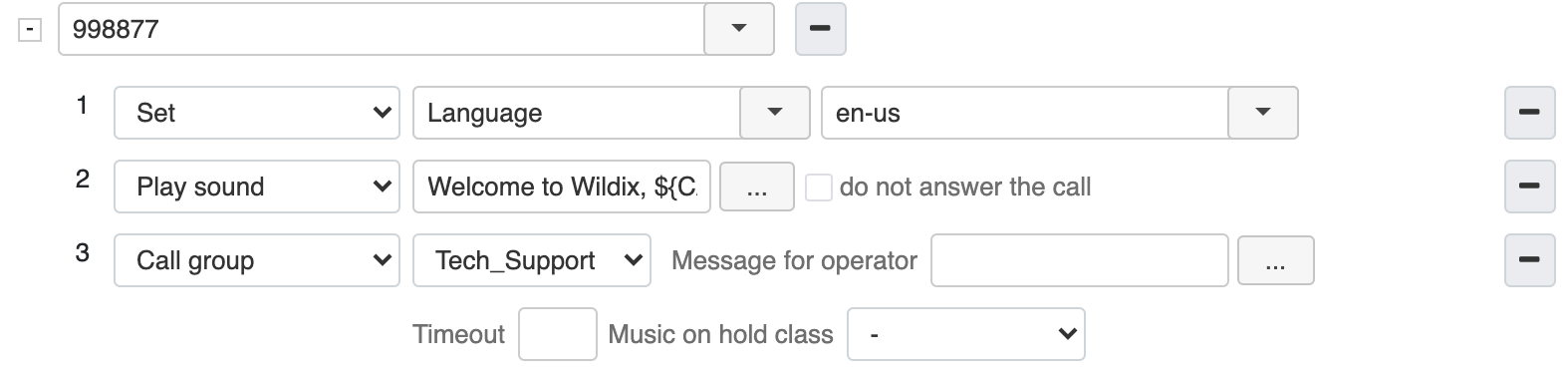
With the help of Speech Synthesis Markup Language, you can make your TTS responses seem more like natural speech. Consult TTS Synthesis Markup Language for details.
CNAM service (Worldwide Phonebook)
Starting from WMS v. 6.02.20230201.1, the service is available for CLASSOUND-enabled PBXs in the USA and Canada, regardless WMS licensing. Prior to the mentioned version, it is available for all systems under Premium license.
Important: The service will stop working in June 2023 for non updated PBXs .
With Caller Name Lookup service you will always know who is calling you, showing whether the call is coming from a mobile or fixed network, even if the person is not present in the enterprise phonebooks or is calling from a different phone number or the caller name could not be defined.
If a caller is not found in the colleagues phonebook and in the enterprise’s shared phonebooks, the system searches in online resources.
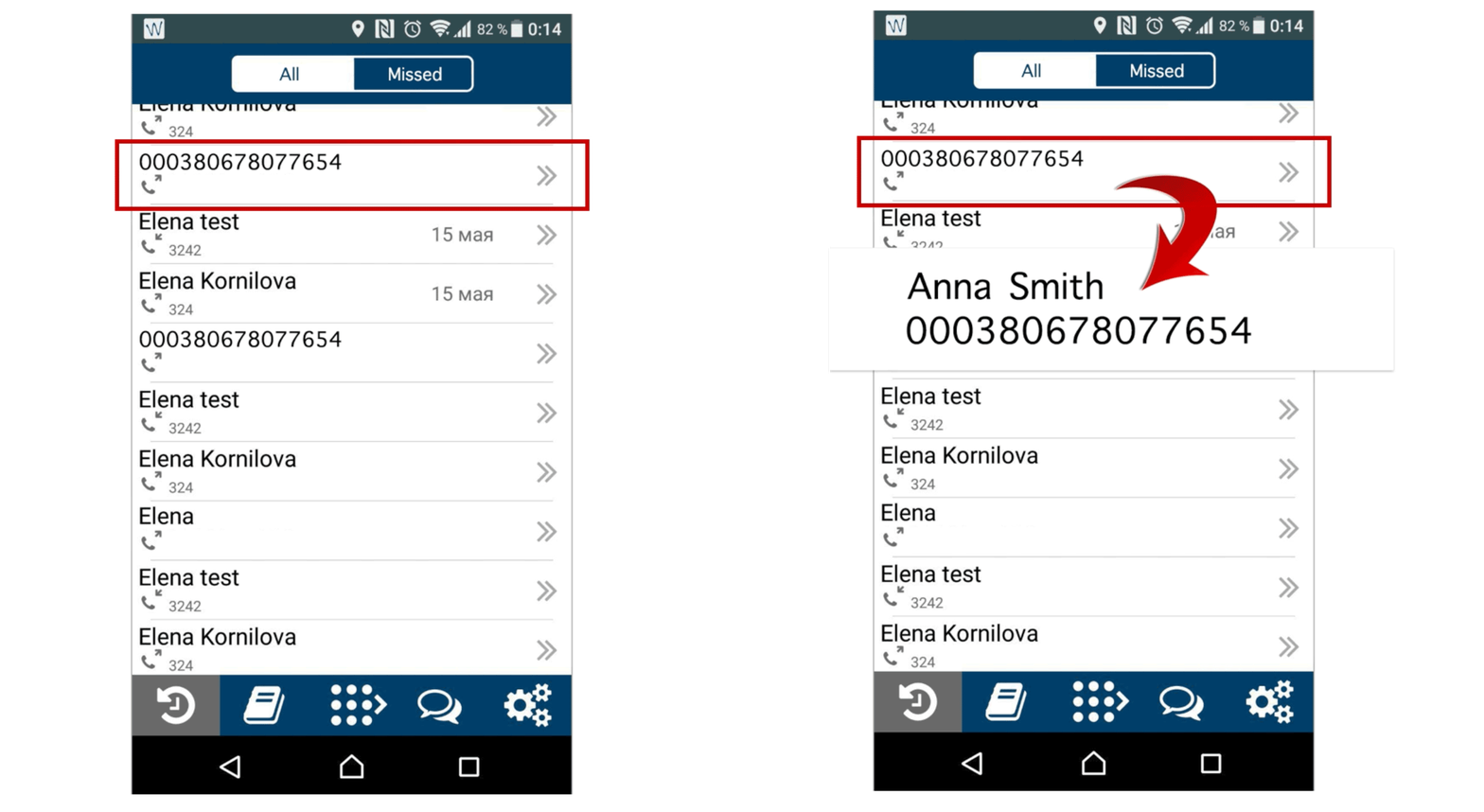
The feature is activated by default on all CLASSOUND-enabled PBXs, but it’s possible to deactivate it by adding the Global Dialplan variable EXTCONTACTLOOKUP=no.
Automatic Speech Recognition (ASR)
1 Premium license provides 2 hours of service per system. Need more hours? Add more Premium licenses.
Supported languages: English, Italian, French, German
Make sure the procedure for calling Feature Codes is present in the "Included Procedures" of the Dialplan used for outgoing calls of users (it is present by default in the "Included Procedures" of the "users" Dialplan).
This service is a real human-computer interaction. Thanks to Automatic speech recognition (ASR) callers can interact with the system using just their voices. Very helpful, especially for visually impaired users! Additionally, thanks to this feature, you can start calls from W-AIR Headset by pressing a button and saying the name of the person or the department you wish to call.
Dial by name via ASR
If you use FC "Directory" 82, the search is performed only among colleagues and not applied to external contacts!
Automated Attendant invites a caller to say the name of the person he or she is looking for. Callers can interact with the system using voice and decide whether to continue the search or to place a call.
Feature can be called via “Dial by name / Directory” Dialplan application or Feature code “Directory” 82.
Available also for W-AIR Headset (press the Call button when there is no active conversation and say the name).
Feature is enabled by default. To return to the old behavior (entering name via DTMF), use these global Dialplan variables:
- IVR_ASR (yes / no, default = yes) for Dialplan application
- IVR_ASR_SERVICES (yes / no, default = yes) for Feature code
DEMO Video:
You can override the standard audio prompts used in "Dial by name" service via Global Dialplan variable "DIALBYNAME_PROMPT=custom string".
How-to:
- Go to WMS -> Dialplan -> General Settings -> Set dialplan variable
- Insert the variable DIALBYNAME_PROMPT=custom string, for example: DIALBYNAME_PROMPT=Please say the first name of the person you wish to call
IVR via ASR with Directory
Speech recognition in Dialplan with Voice control. You can build your own IVR in Dialplan and enable the callers to call people and departments using just their voice.
Documentation: How to configure IVR via ASR with Directory in Dialplan
Demo video:
Configuration tips on how to start calls from W-AIR Headset using Automatic Speech Recognition: read the document W-AIR Headset - User Manual.
Speech To Text (STT)
Voicemail transcription
Each user who needs access to this service, should be assigned a Premium license.
1 Premium license provides 2 hours of service per one user.
It happens that you are on a meeting and you have no opportunity to listen to an important Voicemail you have just received. From now on you can read Voicemails using Speech To Text service directly in your email and reply easily.
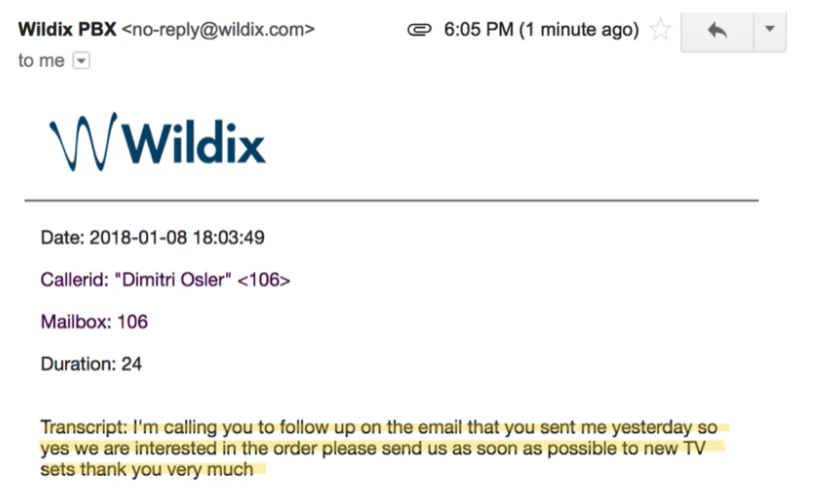
Notes:
Feature is enabled by default (can be disabled in WMS Dialplan -> General Settings, “Convert Voicemails to text and send by email”)
Language of the caller party who recorded the message is used for transcription
Transcripts can be created correctly, only if the corresponding language package is installed on the PBX
- Limitation: 1 min max for each audio file