How to handle JSON inside Diaplan in WMS
- Tatiana Bieliakova
- Ksenia Babych
This guide explains how to handle JSON documents inside Wildix Dialplan.
Created: November 2021
Permalink: https://wildix.atlassian.net/wiki/x/uADOAQ
Starting from WMS Beta 5.04, res_json is integrated into the system. It is a wrapper module around a JSON library that allows you to handle JSON documents inside Wildix Dialplan and send requests to external software (e.g. CRM systems).
List of supported apps and functions
App/ function | Description |
JSONELEMENT(doc,path) | (r/o function) gets the value of an element at a given path in a JSON document |
jsonvariables(doc) | (app) reads a single level JSON document (dictionary) into Dialplan variables |
jsonadd(doc,path,elemtype,name,value) | (app) adds an element to the JSON document at the given path |
jsonset(doc,path,newvalue) | (app) changes the value of an element in the JSON document |
jsondelete(doc,path) | (app) deletes an element in the JSON document |
JSONPRETTY(doc) | (r/o function) formats a JSON document for nice printing |
JSONCOMPRESS(doc) | (r/o function) formats a JSON document for minimum footprint |
Parameters:
doc: the name of the variable that contains the JSON document
Note: All the functions and apps require the name of a Dialplan variable that contains the JSON document, instead of the parseable string itself.
- path: path to the element you are looking for (like /path/to/element, or /path/to/element/3 to identify the element with index 3 in an array)
- elemtype: element type, one of bool, null, number, string, node or array
- name: the name of the element to be added (may be missing if adding elements to an array)
- value: value to be set for the element we added
- newvalue: value to be set
JSONRESULT values
If any of the functions or apps fails, a call would not be terminated. In case an app/ function would need to return an abnormal result, they would do so by setting the value of a Dialplan variable called JSONRESULT. The values are:
- ASTJSON_OK (0) - the operation was successful
- ASTJSON_UNDECIDED (1) - the operation was aborted mid-way and the results are not guaranteed
- ASTJSON_ARG_NEEDED (2) - missing or invalid argument type
- ASTJSON_PARSE_ERROR (3) - the string that was supposed to be a JSON document could not be parsed
- ASTJSON_NOTFOUND (4) - the expected element could not be found at the given path
- ASTJSON_INVALID_TYPE (5) - invalid element type for a jsonadd or jsonset operation
- ASTJSON_ADD_FAILED (6) - the jsonadd operation failed
- ASTJSON_SET_FAILED (7) - the jsonset operation failed
- ASTJSON_DELETE_FAILED (8) - the jsondelete operation failed
Detailed information about apps and functions
JSONELEMENT(doc,path)
Returns the value of an element at the given path.
The element type is set in the Dialplan variable JSONTYPE. Depending on the type of the JSON variable, the values are:
- True, False => returned values are 1 or 0 respectively; JSONTYPE is bool
- NULL => returned value is an empty string; JSONTYPE is null
- Number => returned value is a number; JSONTYPE is number
- String => returned value is a number; JSONTYPE is string
- Array => returned value is a JSON representation of an array; JSONTYPE is array
- Object => returned value is a JSON representation of the underlying object; JSONTYPE is node.
jsonvariables(doc)
Reads a single level JSON document into Dialplan variables with the same names. The JSON document is considered to be the representation of a dictionary, or key-value pairs, containing scalar values. For example, {"one":1,"two":"deuce","three":"III"} will set the values of the Dialplan variables one, two and three to the values 1, deuce, and III respectively. Depending on the type of each variable, their possible values are:
- True, False => 1, 0
- NULL => the resulting variable will contain an empty string
- number, string => the number or the string
- array => the string !array! (array values cannot be returned into a single variable)
- object => string, the JSON representation of the underlying object parameters
jsonadd(doc,path,elemtype,[name][,value])
Adds an element to the JSON document at the given path. The value of the variable that contains the JSON document is updated to reflect the change. The element to be added has a type (elemtype), a name, and a value.
- elemtype can be one of bool, null, number, string, node or array.
A bool "false" value is represented as either an empty string, 0, n, no, f or false (case insensitive); any other value for a bool elemtype is interpreted as true. For a null elemtype, the value paramenter is ignored. - The value parameter is also ignored for an array elemtype: in this case, an empty array is created. Further on, you may append elements to this array using repeated calls to the jsonadd app, for example:
exten => s,n,jsonadd(json,path/there,array,vec)
exten => s,n,jsonadd(json,path/there/vec,string,,abcd)
exten => s,n,jsonadd(json,path/there/vec,number,,1234)
exten => s,n,noop(${JSONELEMENT(json,path/there/vec/0)} & ${JSONELEMENT(json,path/there/vec/1)})
The last line will display abcd & 1234 to the console.
jsonset(doc,path,newvalue)
Sets the value of the element in the JSON document at the given path. The value of the variable that contains the JSON document (doc) is updated to reflect the change. The element that changes the value preserves its name and its type, and must be a boolean, number, or string. The new value is converted to the type of the existing document. This means, if you would try to set the value of a number element to abc, its resulting value will be 0, or if you try to set a boolean element to 13, you will end up with it being true. To set a "false" value to a bool element, use an empty string, 0, n, no, f or false (case insensitive); anything else is interpreted as true.
jsondelete(doc,path)
Deletes the element at the given path from the given document. The value of the variable that contains the JSON document (doc) is updated to reflect the change. You may delete any type of element.
JSONPRETTY(doc)
Returns the nicely formatted form of a json document, suitable for printing and easy reading.
JSONCOMPRESS(doc)
Returns the given JSON document formatted for a minimum footprint (eliminates all unnecessary characters).
Dialplan example
To configure JSON requests in Wildix Dialplan, Custom application has to be used.
Dialplan example:
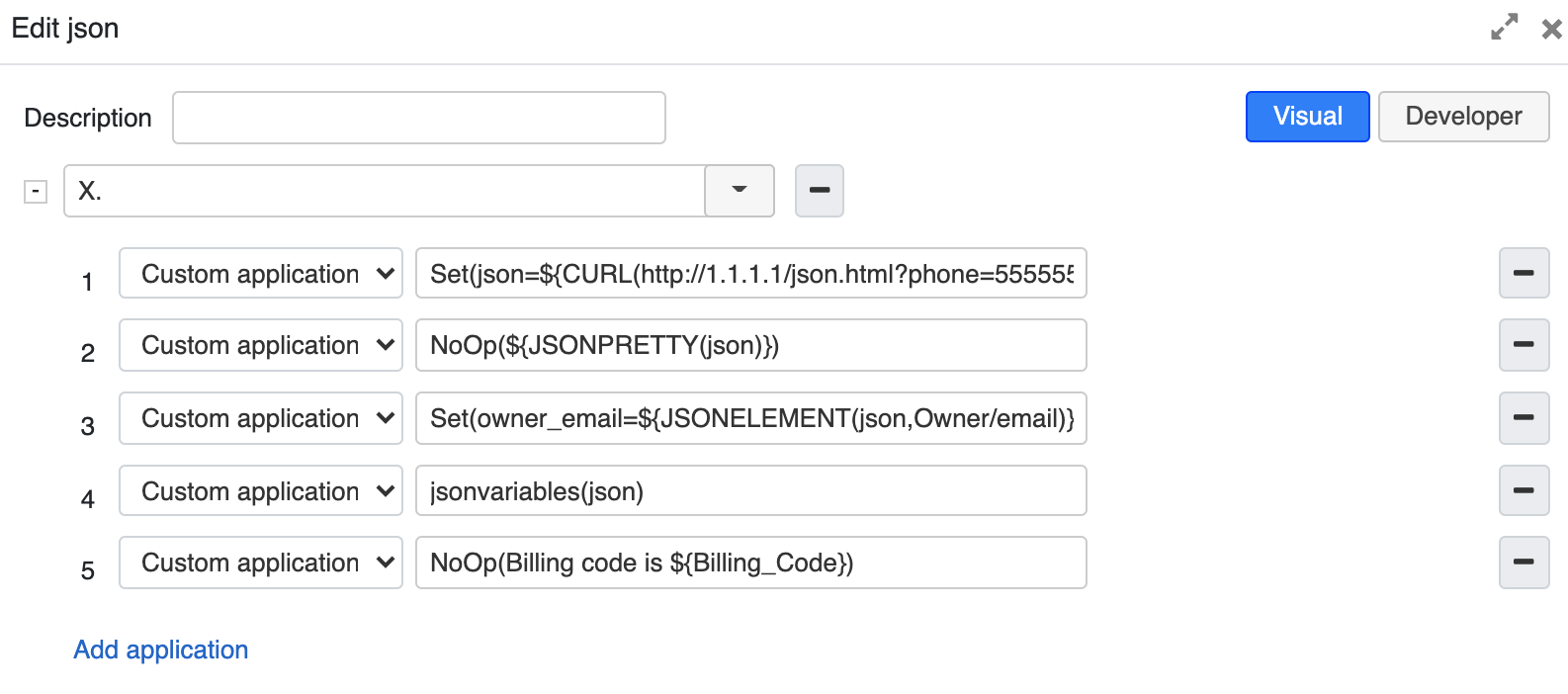
- To indicate path to JSON document, use the CURL(url) variable together with Set():
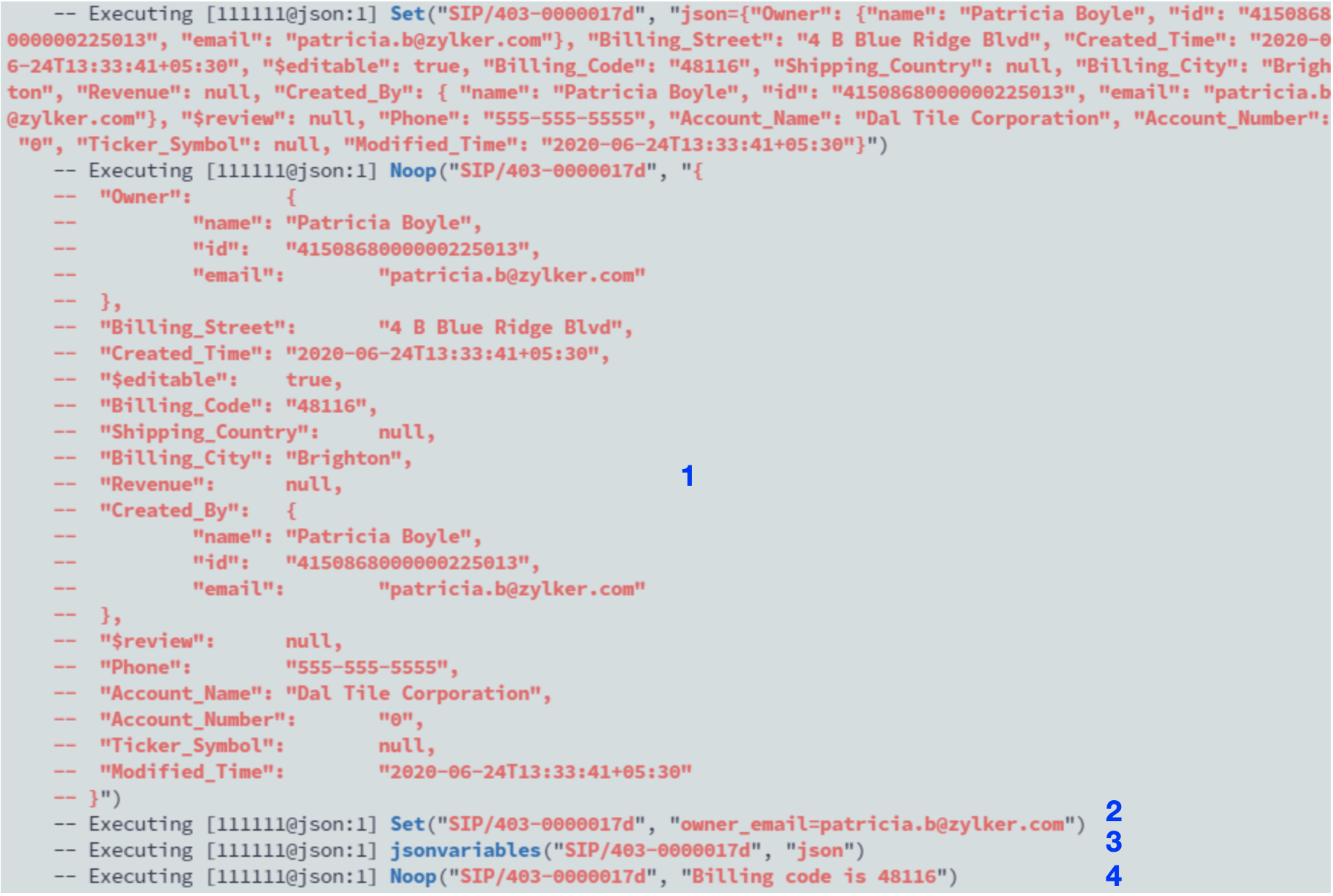
Set(variablename=${CURL(URL)}) - JSONPRETTY used with NoOp function displays JSON values in a neat and easily readable format in logs (1).
- The Set variable with JSONELEMENT function returns the value of an element of JSON document and assigns it to the indicated variablename (2).
- The variable jsonvariables(json) turns JSON values into a Dialplan variable (3).
- The NoOp variable returns the Billing code value (4).