Remote Syslog
- Andrew Ignatenko
- Tatiana Bieliakova
- Ksenia Babych
- Elena Kornilova
The following Admin Guide describes how enable Remote Syslog and explains its basic configuration.
Created: March 2018
Permalink: https://wildix.atlassian.net/wiki/x/SBvOAQ
Background
Rsyslog is the system for log processing. It can deliver over one million messages per second to local destinations when limited processing is applied. Rsyslog can be able to accept inputs from a wide variety of sources, transform them, and output to the results to diverse destinations.
Configuration
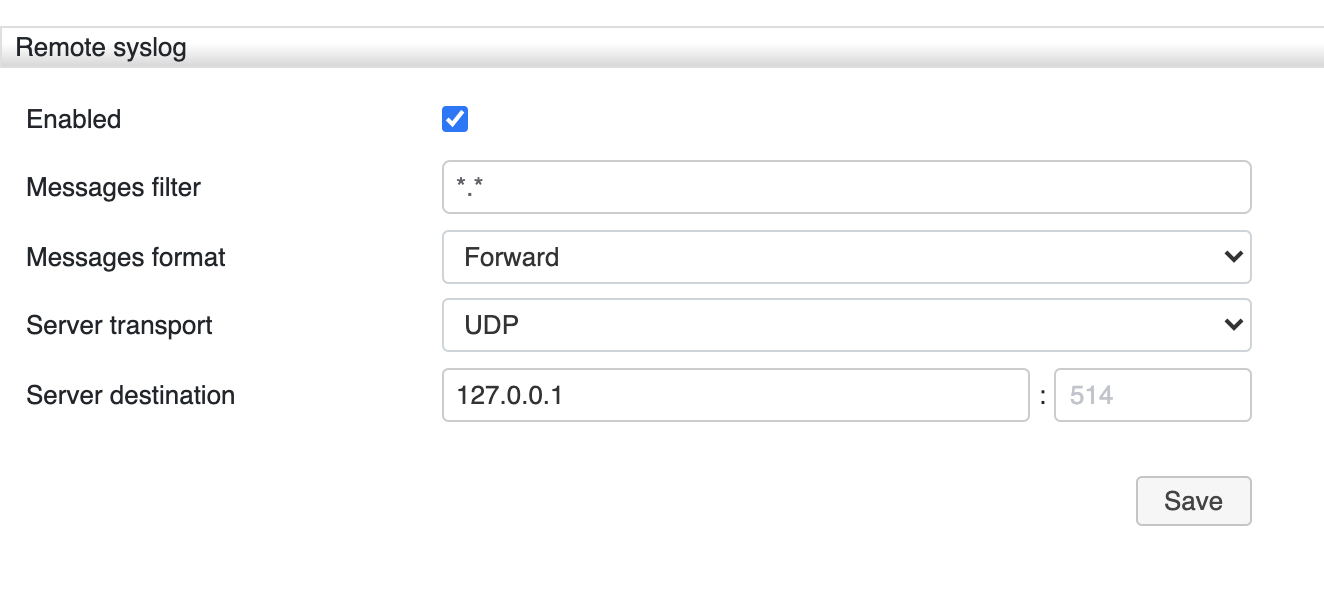
To enable remote syslog, go to WMS Settings -> System -> Remote syslog and check the box "Enabled".
[UDP as a Server Transport]
It is highly recommended to select UDP as a Server Transport in most of the cases.
TCP should be selected only in case the Server is reliable and constantly reachable. Otherwise, TCP packets overfill the network buffer that results in PBX unavailability.
Main rsyslog configuration file is located in /etc/rsyslog.conf, but it should not be used for manual configuration.
Remote logging settings are stored in SQLite Database /var/www/wmsdb, in system table. Based on this settings, remote logging configuration file /rw2/etc/rsyslog.d/remote-server.conf is created.
Every time when remote syslog feature is enabled/ disabled, remote syslog daemon is restarted. When the feature is disabled, remote-server.conf is removed from Directory.
Directory /rw2/etc/rsyslogd/ is a symlink for /etc/rsyslog.d/.
Messages filter
Syslog messages can be filtered based on two conditions: facility and priority separated by a dot. You can create your own filters or use the default ones (see below):
- FACILITY specifies the subsystem that produces a specific syslog message. For example, the mail subsystem handles all mail-related syslog messages. FACILITY can be represented by one of the following keywords (or by a numerical code): kern(0), user (1), mail (2), daemon (3), auth (4), syslog (5), lpr (6), news (7), uucp (8), cron (9), authpriv (10), ftp (11), and local0 through local7 (16 - 23)
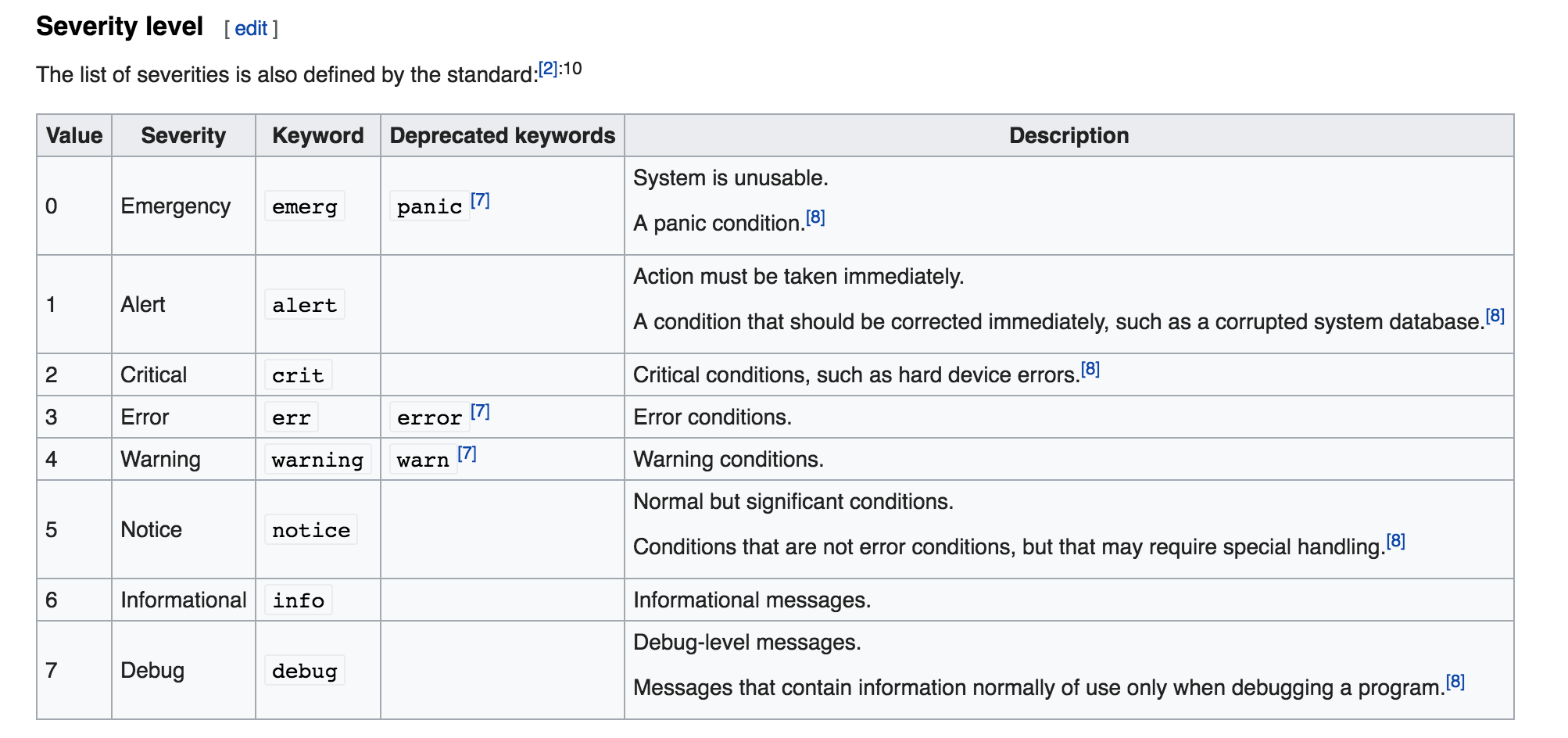
PRIORITY specifies a priority of a syslog message. The priority defines the severity of the message. PRIORITY can be represented by one of the following keywords (or by a number): debug (7), info (6), notice (5), warning (4), err (3), crit (2), alert (1), and emerg (0). The keywords error, warn and panic are deprecated and should not be used anymore. The aforementioned syntax selects syslog messages with the defined or higherpriority. By preceding any priority keyword with an equal sign (=), you specify that only syslog messages with the specified priority will be selected. All other priorities will be ignored. Conversely, preceding a priority keyword with an exclamation mark (!) selects all syslog messages except those with the defined priority.
In addition to the keywords specified above, you may also use an asterisk (*) to define all facilities or priorities (depending on where you place the asterisk, before or after the comma). Specifying the priority keyword 'none' serves for facilities with no given priorities. Both facility and priority conditions are case-insensitive.
To define multiple facilities and priorities, separate them with a comma (,). To define multiple selectors on one line, separate them with a semi-colon (;). Note that each selector in the selector field is capable of overwriting the preceding ones, which can exclude some priorities from the pattern.
Default filters
Select which type of messages will be sent to rsyslog:
- *.* - all messages will be sent
- *.=error - only error messages will be sent
- *.=warn - only warnings will be sent
- *.=info - only info messages will be sent
Messages format
Messages format is specified with the help of templates. Templates allow to specify any format a user might want. They are also used for dynamic file name generation. Every output in rsyslog uses templates - this holds true for files, user messages and so on.
Templates are a key feature of rsyslog. The database writer process expects its template to be a proper SQL statement - so this is highly customizable too.
Template example
Standard Template for writing to files:
template(name="FileFormat" type="list") {
    property(name="timestamp" dateFormat="rfc3339")
    constant(value=" ")
    property(name="hostname")
    constant(value=" ")
    property(name="syslogtag")
    property(name="msg" spifno1stsp="on" )
    property(name="msg" droplastlf="on" )
    constant(value="\n")
    }
Template names beginning with “RSYSLOG_” are reserved for rsyslog use: Select one of the messages format:
- Forward (RSYSLOG_ForwardFormat) - a new high-precision forwarding format very similar to the traditional one, but with high-precision timestamps and timezone information. Recommended to be used when sending messages to rsyslog 3.12.5 or above
- Traditional Forward (RSYSLOG_TraditionalForwardFormat) - the traditional forwarding format with low-precision timestamps. Most useful if you send messages to other syslogd’s or rsyslogd below version 3.12.5
- Syslog protocol 23 (RSYSLOG_SyslogProtocol23Format) - the format specified in IETF’s internet-draft ietf-syslog-protocol-23, which is very close to the actual syslog standard RFC5424. This format includes several improvements. You may use this format with all relatively recent versions of rsyslog or syslogd
Server transport and Server destination
Choose one of the transport protocols to deliver messages to rsyslog based on your network configuration:
- TCP
- UDP
Enter the IP address of remote server and port where all the messages will be sent.
Appendix 1. How to debug rsyslog traffic
In this Appendix you can find tips on how to debug received rsyslog traffic.
In Linux operating system, you can use Netcat utility for listening to specified ports.
- To listen to TCP port:
nc -l <port number>
- To listen to UDP port
nc -ul <port number>
Then server transport & destination with IP address and port should be configured in remote syslog settings.